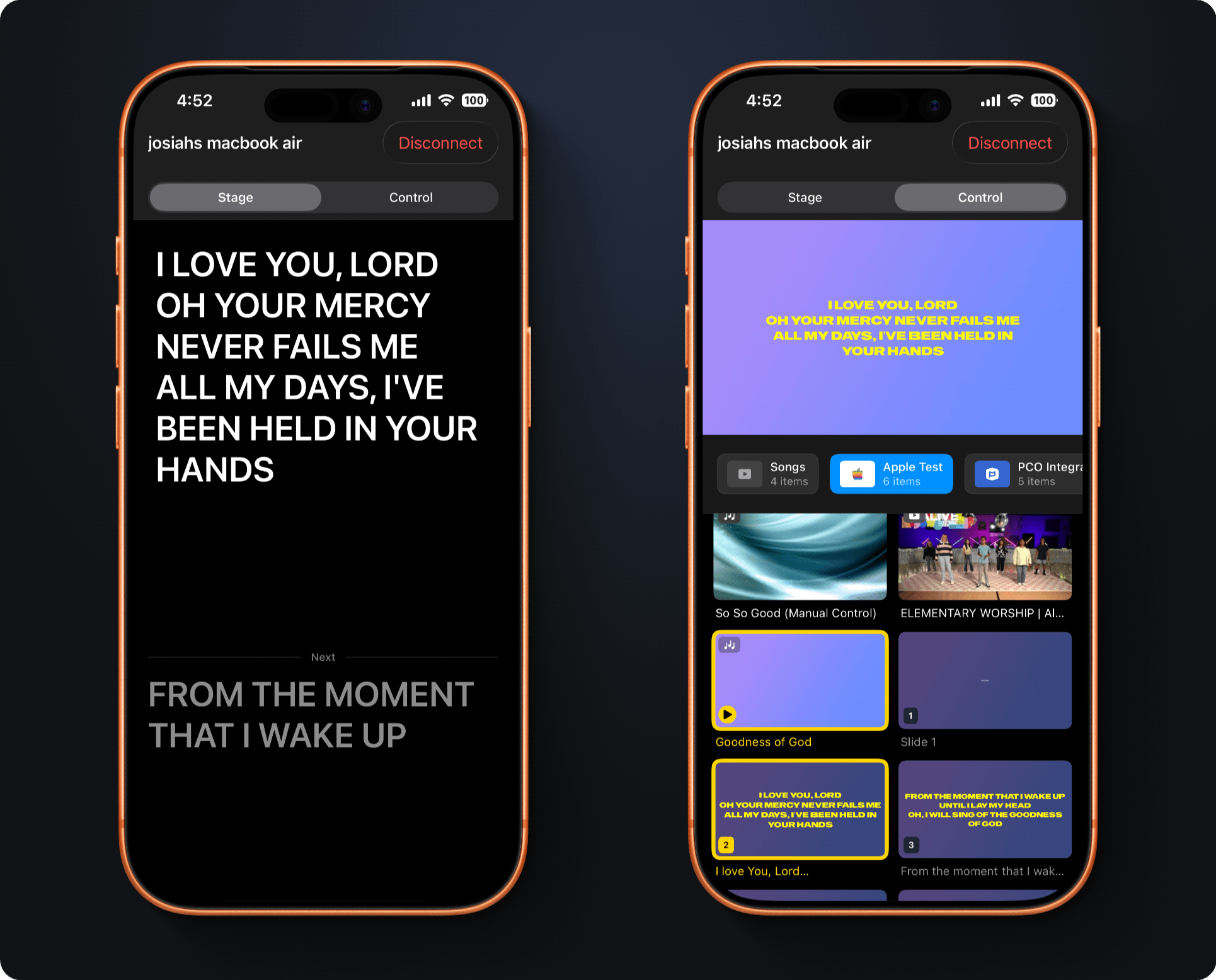
Control LightLoop from your iPhone or iPad — see a live preview of what's on screen, switch playlists, advance slides, and monitor lyrics, all without touching the remote or leaving the room.
A full-screen confidence monitor for the presenter or worship leader. See exactly what's on the Apple TV — lyrics, Bible verses, or the next item — without turning around.
A full production dashboard for the media operator. See a live 16:9 preview of the screen, browse every playlist, tap to jump to any item, and scrub song timelines — all in one place.
Make sure the LightLoop tvOS app is open and showing the playlist grid. LightLoop automatically advertises over Multipeer Connectivity — no web app configuration needed.
Download LightLoop Remote from the App Store on your iPhone or iPad. Launch it and it immediately starts scanning for nearby Apple TVs over Wi-Fi and Bluetooth.
Your Apple TV appears in the device list by name. Tap it to connect. State syncs instantly — playlists, the current item, playback position, and live slide text appear in seconds.
Switch between Stage and Control mode any time. Your mode preference is remembered. If the connection drops, the app reconnects automatically when the Apple TV is back in range.
“This won't be on the screen, but Genesis 3:12 says…” — and it already is. The Remote listens, recognizes the spoken reference, and puts the verse on your Apple TV, then follows along as it's read. It can also jump the presentation to matching sermon points, quotes, and song slides you already prepared. Transcribed on-device; requires iOS 26+. Learn more →
Uses Apple's MultipeerConnectivity framework — the same technology as AirDrop. Works over Wi-Fi and Bluetooth simultaneously, with no router, LAN or internet required.
Lock your phone, walk away, come back — LightLoop Remote reconnects to the last connected Apple TV automatically. No need to find and tap the device again mid-service.
Control mode shows a real-time 16:9 preview of what's currently displayed on the Apple TV — including song lyrics, Bible text, and the live/paused state — updated with every slide change.
Switch between any playlist and jump to any item with a tap — even while a different item is playing. Playlists update live when you change them in the web app, with no reconnect needed.
Tap a song item to expand its individual slides inline. Tap any slide to jump directly to that lyric on the Apple TV, and tap again to close the expansion — just like the web app's playlist editor.
Bible items expand to show each verse with its reference. Tap any verse to send it to the Apple TV screen. The reference is shown above the verse text in both Stage and Control views.
A waveform-style timeline scrubber in Control mode shows the current playback position for songs. Drag to seek, or watch the elapsed/remaining time update in real time as the song plays.
LightLoop Remote adapts to your device. iPhone portrait shows a stacked preview + grid. iPhone landscape hides chrome and goes full-screen for the stage. iPad shows a full side-by-side layout.
Connect before your service starts and browse playlists freely. The Apple TV stays on its idle browse screen until you tap an item to launch a presentation — giving you time to plan ahead.
LightLoop Remote is free. Download it, connect to your Apple TV in seconds, and never be tethered to a laptop again.